
Tips for Creating a Productive Home Office Environment
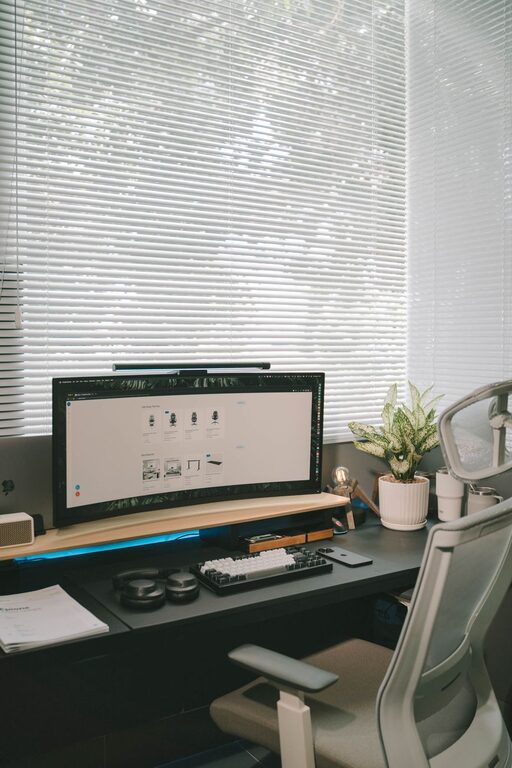
Creating a productive home office environment is essential for anyone working remotely or running a business from home. A well-designed workspace can improve focus, reduce stress, and increase overall work efficiency. Whether you have a dedicated room or a small corner, these tips will help you set up a home office that supports your best work.
1. Choose the Right Location
Finding the ideal spot for your home office is the first step. Ideally, this space should be quiet and away from heavy foot traffic. If possible, use a separate room to minimize distractions and create a distinct boundary between work and home life. If space is limited, a designated area like a nook or a corner with a desk can work well.
2. Invest in Ergonomic Furniture
Comfort is key in a productive workspace since you’ll be spending long hours sitting at your desk. Invest in an ergonomic chair that supports your back, encourages good posture, and reduces strain. A desk at the right height will help prevent discomfort in your wrists and shoulders.
Important ergonomic considerations:
– Adjustable chair height and lumbar support
– A desk height that allows your forearms to rest parallel to the floor
– Monitor positioned at eye level to avoid neck strain
– Keyboard and mouse placement that keeps wrists straight
3. Optimize Lighting
Good lighting reduces eye strain and helps keep you alert. Whenever possible, position your desk near a window to take advantage of natural light. If natural lighting is limited, use bright, warm artificial lights that mimic daylight. Avoid harsh overhead lighting; instead, supplement with desk lamps that provide focused light.
4. Minimize Clutter and Stay Organized
A tidy workspace can make it easier to focus and find what you need quickly. Use organizers, shelves, or filing cabinets to keep supplies and documents in order. Limit unnecessary items on your desk to keep distractions at bay.
Tips for staying organized:
– Use desk trays and drawer dividers
– Keep digital files organized with clear folder structures
– Schedule regular decluttering sessions
5. Personalize Your Workspace
Adding personal touches to your workspace can make it more inviting and comfortable, which encourages productivity. Consider adding plants, artwork, or photos that inspire you. Just be sure to keep the decorations minimal to avoid distractions.
6. Manage Noise Levels
If you cannot choose a quiet room, consider ways to reduce background noise. Noise-canceling headphones can be a great investment, especially if you work in a busy household. Alternatively, playing low-volume ambient music or white noise can help mask distractions.
7. Set Boundaries and a Schedule
A productive home office is not just about physical space but also about creating mental boundaries. Set clear working hours and communicate them with family or housemates. Use a routine to signal the start and end of your workday, such as a morning walk or a specific time to shut down your computer.
8. Keep Technology Updated and Ready
Reliable technology is essential for efficiency. Ensure your computer, printer, and internet connection are fast and dependable. Regularly update software and maintain backups to prevent unexpected interruptions.
9. Incorporate Movement and Breaks
Sitting for long periods can impact your health and productivity. Incorporate short breaks to stretch, stand, or walk around. Consider a standing desk or adjustable desk converter to alternate between sitting and standing throughout the day.
10. Maintain Good Air Quality
Fresh air contributes to better concentration and energy levels. If possible, open windows to ventilate your space regularly. Adding air-purifying plants or using a small air purifier can also help create a healthier environment.
—
Creating a productive home office environment takes some thought and effort but offers lasting benefits. By combining comfort, organization, and thoughtful boundaries, you can build a workspace that supports your professional goals and wellbeing. Start with these tips and adjust your setup to best fit your work style and needs.
Related Post
Tips for Creating a Productive Home Office Space
Discover practical tips to design a home office that boosts focus and efficiency, making work-from-home [...]

Tips for Creating a Cozy Reading Nook at Home
Discover simple and effective tips to design a warm, inviting reading nook right in your [...]
Tips for Creating a Productive Home Office Environment
Discover practical tips to design a home office that boosts productivity and keeps you comfortable [...]